Serum dubstep presets for new musical phrases
Serum dubstep presets for new musical phrases
Content supplied by Patch DNA.
The drums are playing, and the bass part is still a note you put down to hold its place. Patch DNA The Bass generates new bass sounds inside your DAW. Play one with the track and hear whether it suggests a phrase worth keeping.
The Bass generates Serum dubstep presets for Serum 2 and also covers Drum & Bass, Neurofunk and Bass Music. It is designed for musicians who want fresh sounds to make music with, including people who usually reach for preset packs. You can explore it through listening and playing, then use More Like This around a sound that interests you.
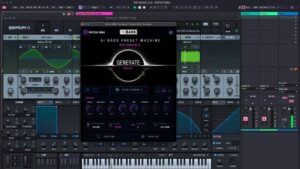
Official Patch DNA product frame showing The Bass with Serum 2 inside Ableton Live.
A small change in the part
Consider a short Dubstep sketch with space between the drum hits. Begin with the placeholder bass phrase and press Generate. A growling sound might encourage a clipped note that stops before the snare. A more sustained character could make you hold the note into that space instead.
Try the musical response as soon as it occurs to you. Move the MIDI note or play the phrase again, and hear the change with the drums running. A new sound can alter the part even when the tempo and chords remain the same.
There is room for an unfinished idea here. You might like the first half of a phrase and want to change the answer. Keep the useful part in the DAW and try another sound for the response. The instrument provides presets for you to play; the rhythm and arrangement remain your decisions.
The Bass works inside compatible DAWs on Windows and macOS. That keeps the audition close to the music you are writing. A pause, a longer note or an unexpected accent can be tried in the same project, with the other parts still around it.
Following the character that caught your ear
A preset pack is a fixed collection of finished sounds. It can be a pleasure to browse one and find a favourite. A generator adds a different kind of exploration: choose a musical direction, generate candidates and ask for related variations when you find something you enjoy.
In The Bass, More Like This lets you continue around that result. For the Dubstep sketch, keep a short phrase playing while you listen to those variations. You can judge how each one answers the drums before deciding whether to change the notes.
You may end up with two ideas that each have a place: a compact bass phrase under the verse and a held response for another section. Save both while their roles are clear. Equally, one sound may be enough for the track. Further exploration can wait until the arrangement asks for it.
Different bass worlds to spend time in
The genre focus gives the search a musical setting. A musician working on Drum & Bass may be drawn to a rolling bass or the sustained movement of a Reese. A Neurofunk session could begin with a rougher texture and a short phrase that leaves space for the break. The Bass also covers Dubstep and the broader Bass Music palette.
These directions give you sounds to react to. They leave plenty of choices in your hands, including how much space a part needs and whether the bass should lead the sketch or support another melody.
Creations and Favorites help keep the discoveries you choose. Save the preset and a short musical sketch in your DAW, especially when the sound makes you play something you would like to hear again. The recording can remind you why that particular candidate stayed.
Active macros provide accessible adjustments, and the generated preset remains editable in Serum 2. A separately purchased, installed and activated copy of Serum 2 is required.